 Minecraft Bedrock
Install a Behavior Pack (add-on) on a Minecraft Bedrock server
Complete guide to downloading and installing a Behavior Pack (add-on) on your hosted Minecraft Bedrock server.
 Minecraft
Try this guide on a real Minecraft server, free for 12 hours
A Minecraft server ready in minutes to put this tutorial into practice, then you decide.
- No credit card
- 12 hours from first launch
- One trial per person
Behavior Packs (also known as addons) allow you to modify the gameplay of Minecraft Bedrock.
Here's how to easily find and install them on your Bedrock server.
Where to find Behavior Packs?
Here are the most reliable sources for downloading addons:
- 🌍 MCPEDL → the most popular community site.
- 🌍 Planet Minecraft → special Bedrock section.
- 🌍 ModBay → recent and varied packs.
- 📦 GitHub & Discords → some creators publish their add-ons directly.
- 🛒 Minecraft Marketplace (in-game) → some packs are paid, but be aware that they are not always compatible with external servers.
⚠️ Files are generally in the following formats:
.mcaddon→ often a complete pack containing resource_packs + behavior_packs..mcpack→ generally corresponds to a single pack (either a resource pack or a behavior pack).
These files are actually ZIP archives: you can unzip them to check their contents.
Want to put this guide into practice on your own server? Minecraft server hosting from €3.99/month at LordHosting, online in a few minutes.
Installation steps
- Download the Behavior Pack of your choice (.mcaddon or .mcpack).
- Unzip the file if necessary (right-click → Extract).
- You will get a folder containing a
manifest.jsonfile. - This folder must be placed in the behavior_packs directory.
- You will get a folder containing a
- Log in to your LordHosting panel and open the File Manager tab.
- Open your Minecraft world folder.
- Place your folder in behavior_packs (create it if necessary).
- If your addon also includes a resource pack, place it in the
resource_packsfolder.
Now that this is done, there is one more thing we need to do to ensure that your addons are recognized by the server.
- Click on the "File manager" tab to access your server files.
- Next, find the folder named "world," click on it, and open your world folder.
- Press the "New file" button at the top of your page to create a new file.
- In this file, copy and paste the following, then modify the
pack_idandversionelements
[
  {
    "pack_id": "UUID of the pack",
    "version": [the,version,here]
  }
]
You can find your information in the manifest.json file of your add-ons:
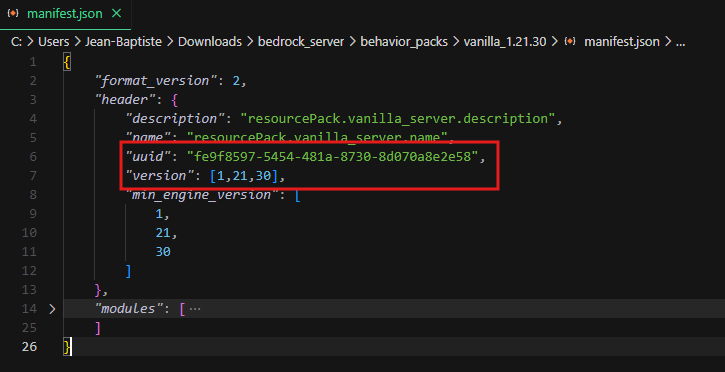
In the pack_id of your created file, replace UUID of the pack with the uuid of your add-ons, then replace [the,version,here] with the version of your add-ons.
5. Save your file by clicking on "Create File" and name it world_behavior_packs.json.
6. Launch your server and enjoy your add-ons.
❗Always good to know❗
- If your Behavior Pack/Add-ons contains a texture pack, follow the same procedure, simply send your texture pack to the
resource_packsfolder. - If you have a texture pack to add, follow the same procedure as in step 5, naming the file
world_resource_packs.json
😉 TIP: To add multiple add-ons or texture packs to the world files (world_behavior_packs.json and world_resource_packs.json), simply add new values:
[
  {
    "pack_id": "UUID of the pack",
    "version": [the,version,here]
},
{
    "pack_id": "UUID of the pack",
    "version": [the,version,here]
}
]
Important tips
- Always check the compatibility of the add-on with your version of Minecraft Bedrock.
- Back up your files before installing new packs.
- If the server does not start correctly, remove the faulty add-on or open a support ticket.
👉 Don't have a Minecraft Bedrock server yet?
Order yours now from LordHosting 🎮
Put this guide into practice on your own server
From €3.99/month. Online in a few minutes, anti-DDoS protection, 7/7 support, no commitment.
Related guides
Minecraft Bedrock Commands: The Complete List (PC, Switch, PS5, Xbox)
Every Minecraft Bedrock command: opening the console on PC and consoles (Switch, PS5, Xbox), /allowlist, /daylock, gamerules, Bedrock exclusives (/camera.
How to update your Minecraft Bedrock server
Follow our step-by-step guide to update your Minecraft Bedrock server. Easily install the latest official version of Bedrock Dedicated Server.
PocketMine-MP Is Dead: How to Migrate to PowerNukkitX in 2026
PocketMine-MP shut down in July 2026 after 14 years. PowerNukkitX is the recommended successor for a Minecraft Bedrock server: differences.
How to install a plugin on your Minecraft Pocket Edition server
Step-by-step tutorial to install a PocketMine plugin on your Minecraft Pocket Edition server: download, plugins folder, restart and configuration.