Minecraft hosting: your Java or Bedrock server in seconds
From €3.99/month. One-click modpacks and plugins, console and mobile crossplay, gaming anti-DDoS, servers in Marseille. Online in under a minute.A Lordhosting Minecraft server is a Java or Bedrock server delivered automatically in under a minute, with CurseForge and Modrinth modpacks, Paper, Spigot or Purpur plugins, Bedrock add-ons and PowerNukkitX installed in one click from the panel. Servers are hosted in Marseille, France, with gaming anti-DDoS protection included, 7/7 support and a free 24-hour trial with no credit card. Plans start at €3.99/month with no commitment, at the same price on Java and Bedrock.
Create your server in seconds!
Choose your Minecraft hosting range
Java or Bedrock, same price: you pick the edition when ordering. Playing on console or mobile?

 Intel Xeon Gold 6242R @4.1Ghz
- Customizable IP
- No commitment required
- 1 Backup
- Anti-DDoS Game
- Web hosting optional

- Intel Xeon Gold 6242R @4.1Ghz
- Customizable IP
- No commitment required
- 2 Backups
- Anti-DDoS Game
- Web hosting optional

- Intel Xeon Gold 6242R @4.1Ghz
- Customizable IP
- No commitment required
- 3 Backups
- Anti-DDoS Game
- Web hosting optional

- Intel Xeon Gold 6242R @4.1Ghz
- Customizable IP
- No commitment required
- 4 Backups
- Anti-DDoS Game
- Web hosting optional


- Intel Xeon Gold 6242R @4.1Ghz
- Customizable IP
- No commitment required
- 6 Backups
- Anti-DDoS Game
- Web hosting included

- Intel Xeon Gold 6242R @4.1Ghz
- Customizable IP
- No commitment required
- 8 Backups
- Anti-DDoS Game
- Web hosting included
Dedicated Minecraft Server - maximum performance
For demanding modded servers or large communities, renting a dedicated Minecraft server is essential.
- ✓100% dedicated resources, end to end
- ✓Ideal for heavy modpacks (ATM, FTB, RLCraft) and plugin servers
- ✓Full Java configuration customization
- ✓Priority support
 1-click Plugins
 1-click ModPacks
 1-click Mods
 Built-in AI Assistant
 Pterodactyl Panel
 Automatic Backups
 24/7 Support
 Free Subdomain
 Unlimited Servers
 Full Dedicated Control
 Anti-DDoS Protection
Free 24h trial - no commitment
Not convinced? Try our Minecraft hosting free for 24 hours, no credit card, no commitment. Your server is ready in under a minute. If it is not for you, you owe nothing.
Java or Bedrock: which edition to choose?
Minecraft comes in two editions that do not connect to the same servers. Bedrock Edition runs on mobile, Windows 10 and 11, Xbox, PlayStation and Switch. Java Edition runs on PC only. A Minecraft Bedrock server therefore welcomes your console and mobile players, a Java server your PC players. At LordHosting both editions cost the same: you simply pick the edition when ordering.
| Criteria | Minecraft Java | Minecraft Bedrock |
|---|---|---|
| Platforms | PC only (Windows, macOS, Linux) | Windows 10 and 11, Android, iOS, Xbox, PlayStation, Switch |
| Customization | Mods (Forge, Fabric, NeoForge), modpacks and plugins (Paper, Spigot, Purpur) | Add-ons and behavior packs, plugins with PowerNukkitX or PocketMine-MP |
| Crossplay | Between Java players; Bedrock players through the GeyserMC plugin | Native across every Bedrock platform |
| Default port | 25565 (TCP) | 19132 (UDP) |
| Versions at LordHosting | Vanilla, Paper, Spigot, Purpur, Forge, Fabric, NeoForge and modpacks | Vanilla Bedrock (BDS), PowerNukkitX, PocketMine-MP |
| Price at LordHosting | From €3.99/month | From €3.99/month, same grid as Java |
The original PC version: Forge/Fabric mods, Paper/Spigot plugins, the biggest community. With Geyser, console players can even join you.
The native crossplay version for mobile, console and Windows. See how to join your server from a console
Need to connect several servers together? Build your network with BungeeCord
Minecraft Realms or hosted server: what price, what differences?
A Minecraft Realm costs €3.99 per month on Bedrock (you + 2 friends) and €7.99 per month for Realms Plus or Java (you + 10 players). A LordHosting Coal server costs €3.99 per month, with no player limit, on Java or Bedrock, with plugins, mods and full file access.
| Plan | Price per month | Players | Customization |
|---|---|---|---|
| Realms Bedrock | 3,99 € | 3 max (you + 2 friends) | No plugins, no third-party add-ons, no file access |
| Realms Plus or Realms Java | 7,99 € | 11 max (you + 10 players) | Realms Plus catalogue packs only, no mods or plugins |
| LordHosting Coal | 3,99 € | Unlimited | Java or Bedrock, plugins, mods, modpacks, add-ons, full file access |
Minecraft Realm price vs LordHosting server
Mojang lists its Realms in dollars: $3.99 per month for Realms Bedrock, $7.99 for Realms Plus and for Realms Java (prices checked on 2 November 2026 on minecraft.net). On the French App Store, the same subscriptions are billed at €3.99 and €7.99. For the same price, the LordHosting Coal plan gives you a real server: 4 GB of RAM, unlimited slots, backups and anti-DDoS. And for the price of a Realms Plus, the Iron plan brings 8 GB of RAM, enough to run plugins or a small modpack.
What a Realm does not allow
- 10 simultaneous players at most, 2 on a basic Bedrock Realm
- No plugins, no mods, no free add-ons: only the Realms Plus catalogue
- No access to the server files or console
- No version choice: the Realm follows the latest update
- No Java/Bedrock crossplay through Geyser
Choose your Minecraft version and install your favourite modpacks
 PaperMC
 Spigot
 Forge
 Fabric
 Vanilla
 PurPur
 Vanilla Bedrock
 PowerNukkitX
 PocketMine-MP
 Mohist
 Catserv
 ATM
 The Pixelmon
 RlCraft
 BetterMc
Vanilla, Paper, Spigot, Purpur, Forge, Fabric, NeoForge. One-click CurseForge and Modrinth modpacks: All The Mods, Pixelmon, RLCraft, BetterMC and hundreds more.
Vanilla Bedrock (BDS, Mojang's official server), PowerNukkitX and PocketMine-MP for plugins, add-ons and behavior packs installable from the panel.
Minecraft Bedrock hosting: play from mobile, Xbox, PlayStation and Switch
A Minecraft Bedrock Edition server to play together on mobile, Windows, Xbox, PlayStation and Switch, online in minutes. Rent your Minecraft Bedrock server (formerly Pocket Edition) from €3.99/month: instant setup, native crossplay across every Bedrock platform, gaming anti-DDoS included and servers hosted in Marseille, France. Vanilla Bedrock, PowerNukkitX and PocketMine install in 1 click, with 7/7 support.
Our Minecraft Bedrock Edition servers are available on your favorite devices
 Xbox
 Playstation
 Android
 Apple iOSSwitch, Windows
Join your Bedrock server from a console
On Windows, Android and iOS, simply add your server with its address and port (19132 by default) from the Servers tab in the game. On Xbox, PlayStation and Switch, Minecraft does not offer this field for third-party servers: you need a small workaround, which only takes a few minutes.
Add it directly in the game
Open the Servers tab, choose Add Server, then enter the address and port of your Lordhosting server. The server stays saved in your list for your next sessions.
BedrockConnect through the console DNS
In the console network settings, replace the primary DNS with the BedrockConnect project one (address published on the project website). When the game starts, the featured servers open a menu where you enter the address and port of your server.
The BedrockTogether app
Install BedrockTogether (Android or iOS) on a phone connected to the same Wi-Fi as the console, enter the address and port of your server: it then shows up in the Friends tab of the console, like a local network game.
BedrockConnect and BedrockTogether are third-party projects, independent from Mojang and Lordhosting. The default Minecraft Bedrock port is 19132: if your server uses another one, remember to enter it with the address at every connection.
Going further on Bedrock: Bedrock commands, add an add-on, update your Bedrock server or migrate from PocketMine to PowerNukkitX.
Easily manage your server with our Minecraft host panel
Explore a new dimension of server management with our customized Minecraft panel Designed to give you total control over your Minecraft server From selecting the game version to easy installation of mods and plugins, every tool you need is at your fingertips
Switch versions in one click
- Switch from 1.8 to 1.21 instantly from the panel.
- Compatible with all Vanilla, Spigot, Paper and Forge versions, and with Vanilla Bedrock, PowerNukkitX and PocketMine on the Bedrock side.
- No technical skills required, everything is automated.
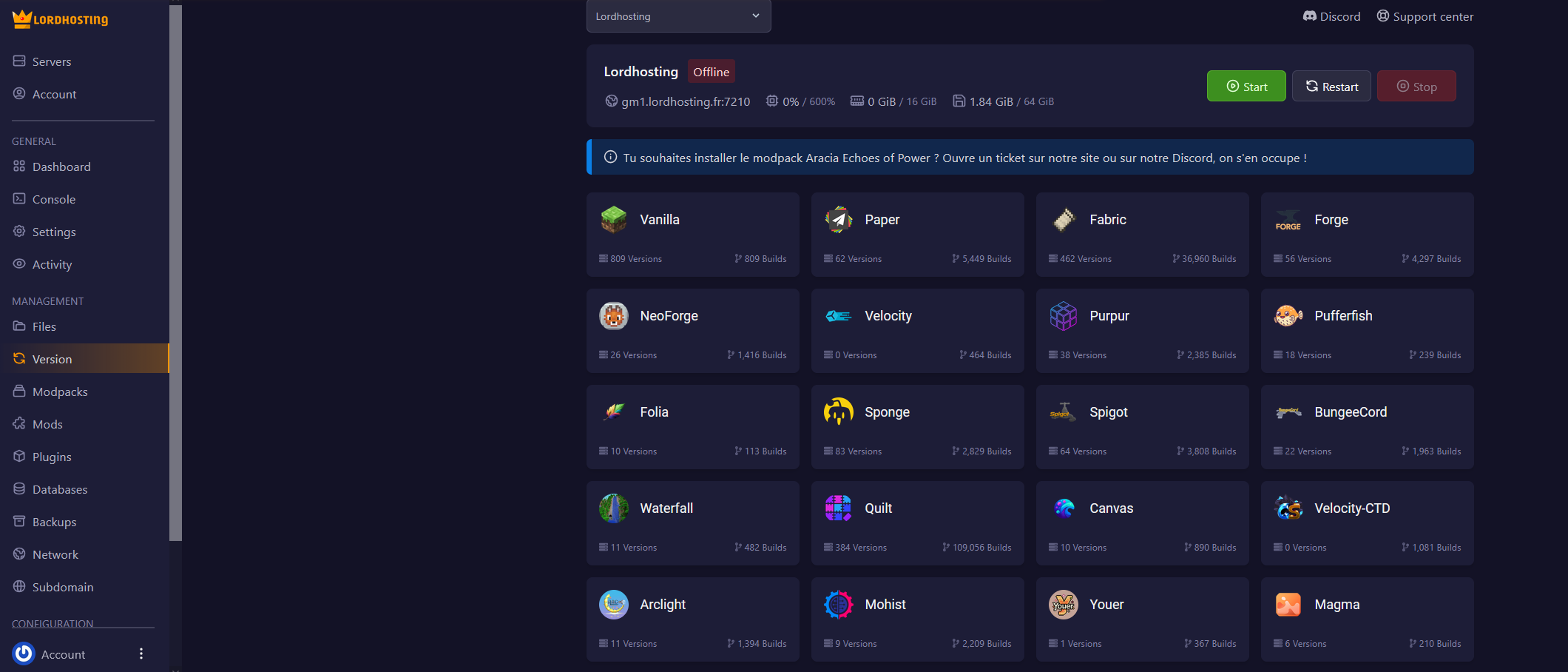
Manage your Minecraft server from your mobile phone with our app
With the LordHosting app, manage your server from your phone: files, restarts and resource usage in one tap. A smooth, intuitive interface built for demanding players. Available on Android, soon on iOS.

Rent your Minecraft server in 3 steps
Renting a server from a specialized Minecraft host requires no technical skills: everything is managed from the web panel.
Choose your edition and plan
Java or Bedrock, Standard range from €3.99/month or Extreme 5GHz for large communities. No-commitment rental, cancel anytime.
Receive your access
Automatic delivery in under a minute. Your credentials arrive by email and your management panel is immediately operational.
Invite your players
Choose your version (Vanilla, Paper, Forge, Fabric, Vanilla Bedrock, PowerNukkitX...), install mods, plugins or add-ons in 1 click, then share your IP with your players.
Going further: find the seed of your world, allow cracked versions, enable the whitelist, install Fabric and your mods or keep the list of Minecraft Java commands at hand. Playing on console or mobile? Check out our Minecraft Bedrock server.
How much RAM for your Minecraft server?
RAM determines how many players and mods your server can handle without lag. On Java, the Java Virtual Machine (JVM) consumes part of it: always plan a margin above the strict minimum. A Bedrock server uses less RAM than a Java server for the same number of players.
| Your project | Recommended RAM | Suitable plan |
|---|---|---|
| Vanilla with friends (2 to 5 players) | 4 Go | Charbon (3,99€/month) |
| Bedrock server (mobile, console), up to 10 players | 4 - 8 Go | Charbon (3,99€) · Fer (6,99€) |
| Paper/Spigot plugins (5 to 10 players) | 8 Go | Fer (6,99€) · Solar 5GHz (12,99€) |
| Small Forge/Fabric modpacks | 8 - 12 Go | Fer (6,99€) · Or (9,99€) |
| Large modpacks (ATM, RLCraft, Pixelmon) | 12 - 16 Go | Or (9,99€) · Diamant (13,99€) · Lunar 5GHz (19,99€) |
| Large community (50+ players) | 24 - 64 Go | Emeraude (23,99€) · Netherite (39,99€) · Dedicated |
Need more details? Read our full RAM guide
Why choose LordHosting as your Minecraft host?
Since 2020, we have been supporting thousands of Minecraft players with high-performance hosting, responsive support and affordable prices.
One-click modpacks and mods (CurseForge, Modrinth)
Forge, Fabric or NeoForge: pick your modpack from the panel catalog and it installs itself, with no file transfer. All The Mods, Pixelmon, RLCraft or BetterMC are ready in minutes.
Plugins: Paper, Spigot, Purpur
Switch to Paper, Spigot or Purpur in one click, then install your favorite plugins from the built-in catalog: WorldEdit, EssentialsX, LuckPerms or Geyser to welcome Bedrock players. Updates are handled from the panel.
Java and Bedrock at the same price, switch edition without buying again
One single grid, from Coal to Netherite, for both editions. You pick Java or Bedrock at checkout and can switch edition later on a simple request to support, without buying a new server: RAM, storage and backups are the same.
Anti-DDoS and servers located in Marseille
Your servers run in the Digital Realty MRS2 datacenter in Marseille, with gaming anti-DDoS protection included and active 24/7. Low latency for French and European players, and 7/7 support whenever you need it.
They found the ideal service
At Lordhosting, we strive to ensure the excellence and affordability of our services meet your most ambitious projects.
Perfect host!
"Lordhosting is a hosting company I've used that's much better. I use it for a Minecraft server and there's 0 lag! I'd give it 5 stars, but you'd still have to add a tab on the game panel to configure everything without having to wade through the files."

Top-notch hosting provider
"I've been able to test a lot of hosting services, whether vps, minecraft or discordJs, and LordHosting is the one that caught my attention the most. I've been hosting my projects with LordHosting for some time now, and in terms of value for money, it's perfect!"

Evolving platform with unique features
"Good experience. Quite responsive and understanding team. An evolving platform with unique features for Minecraft servers! Performance is consistent with the services sold, so top-notch."

Exceptional and very patient support
"I use a Minecraft server at LordHosting, and I have to say their support is just exceptional. Every time I had a question or a small issue, the team responded very quickly and with a lot of patience and professionalism. They really take the time to help, even when you're a beginner, and explain things clearly. Thanks to them, my server runs perfectly and I was able to configure everything stress-free. Honestly, I recommend LordHosting to anyone looking for a serious host with responsive, friendly and efficient support."

Spot-on MCPE plan, zero lag
"I recommend this host, the staff responds quickly and stays professional! I got an MCPE plan and honestly nothing to complain about: no lag, no issues with the host, everything's spot on. Great hosting."
One-click NeoForge install
"I got a Minecraft server host from them and I'm very satisfied. NeoForge installs in one click and support is responsive and always there."
Great pricing and attentive support
"Very responsive customer service that takes the time to help. Great pricing for a Minecraft server, and the staff know how to take charge quickly whenever there's an issue."
Minecraft, Bedrock, Hytale: never disappointed
"Customer service is really responsive and takes the time to help. On the server side, I've never been disappointed, whether for Minecraft Java/Bedrock or even Hytale. I highly recommend LordHosting!"
Reliable web host, great for playing with friends
"I find LordHosting very reliable, thanks to how quickly their teams respond to requests. The value for money is excellent, and it's a great choice for playing with friends on games like Minecraft."

I highly recommend
"Fast delivery, the panel is easy to use and above all the support team really helps and answers all questions without showing any sign of annoyance or anything else, in short professional and pleasant."
Responsive team that listens
"Very fast, the team really listens to its customers. I had a data transfer done in just one evening, and seeing the work they did, I felt compelled to write this review to recommend their service."
Reliable, fast and very stable service
"Excellent experience with Lord Hosting! The service is reliable, fast and very stable. The interface is clear and easy to use, even for beginners. Customer support is responsive, professional and always ready to help when needed. Server performance is excellent and prices are very competitive for the quality offered. I highly recommend Lord Hosting to anyone looking for serious and efficient hosting."
An excellent hosting company
"Lordhosting is an excellent hosting company, with quality services, very attractive prices and, above all, an efficient and very helpful staff! I recommend them 100% for their reliability."
Great discovery
"Super discovery, I have several services with them so far absolutely not disappointed! What's more, customer support is very responsive and welcoming. I highly recommend it!"
Top accommodation
"I have been a lordhosting customer for over a year now. The owner himself takes time to answer your questions and helps you with any problems. He's very patient, even if you don't always get it right first time!"
Guides & Resources
Every Java command: console, gamerules, teleportation, XP, server admin and Java exclusives.
Read the guide How to create a Minecraft server (Java & Bedrock)Complete 2026 guide: self-hosting or hosting provider, server.properties config, mods, plugins and costs.
Read the guide How much RAM for a Minecraft server?Complete 2026 guide: recommended RAM per modpack, number of players and server type.
Read the guide Which framework to choose for your Minecraft server?Vanilla, Spigot, Paper, Forge, Fabric... Full comparison to make the right choice.
Read the guide How to install Fabric on your Minecraft serverStep-by-step tutorial to install Fabric, the lightweight and performant mod loader.
Read the guide WorldEdit: install the plugin and import a schematicInstall WorldEdit on Paper/Spigot, import a .schem schematic and paste entire builds from your panel.
Read the guide Which Java version for Minecraft?Java 8, 17 or 21: the right version based on your Minecraft version (1.8 to 1.21).
Read the guide Custom IP for Minecraft Java serverSet up a domain like play.myserver.com with an SRV record.
Read the guide Enable Minecraft Java + Bedrock CrossplaySet up GeyserMC so your PC, PS5, Xbox and Mobile players can play together.
Read the guide Enable the whitelist on your Minecraft serverProtect your server by only allowing players of your choice.
Read the guide Free Minecraft Server: Your Options and Their LimitsFree Minecraft server: a comparison of the free options (Aternos, Falix, self-hosting), their real limits and when it's time to move to a paid server.
Read the guide The Best Minecraft Mods (and How to Install Them)The best Minecraft mods and modpacks, and how to install them step by step in singleplayer and on your Minecraft server (Forge, Fabric, NeoForge).
Read the guide Minecraft Warden: The Complete GuideEverything about the Minecraft Warden: where it spawns, its health, its attacks and the best strategies to avoid it or defeat it in survival.
Read the guide Blue Axolotl in Minecraft: How to Get OneHow to get a blue axolotl in Minecraft: the 1 in 1,200 breeding odds, tropical fish buckets, every colour, taming questions and what axolotls are for.
Read the guide Minecraft Beacon: the complete guideHow to craft a beacon in Minecraft, build the pyramid from level 1 to 4, pick the best effects and activate it: a complete guide with tables.
Read the guide Minecraft enchantments: full list and best picksThe full list of Minecraft enchantments, how to build a level 30 enchanting table with 15 bookshelves, and the best enchantments for every item.
Read the guide Copper Golem in Minecraft: the complete guideHow to build a copper golem in Minecraft, what it does, how it oxidizes and how to use it to sort your chests automatically, solo or on a server.
Read the guide GeyserMC: Java and Bedrock crossplay on your serverInstall GeyserMC and Floodgate so Bedrock players (mobile, console) can join your Minecraft Java server. Step-by-step guide with ports and a ready config.
Read the guide Minecraft Bedrock commandsEvery Bedrock command: console on PC and consoles (Switch, PS5, Xbox), /allowlist, /daylock, coordinates and exclusives.
Read the guide Migrate from PocketMine to PowerNukkitXPocketMine-MP has shut down: how to migrate your Bedrock server to PowerNukkitX in under an hour.
Read the guide Add an addon to your Bedrock serverInstall custom addons on your Minecraft Bedrock server.
Read the guide Update your Minecraft Bedrock serverKeep your server up to date with the latest Bedrock versions.
Read the guide Install a plugin on your PocketMine serverAdd plugins to enrich your Minecraft Pocket Edition server.
Read the guide Add a map to your Bedrock serverImport custom maps to your Pocket Edition server.
Read the guide