 Minecraft Java Edition
Copper Golem in Minecraft: the complete guide
How to build a copper golem in Minecraft, what it does, how it oxidizes and how to use it to sort your chests automatically, solo or on a server.
A copper golem is built by placing a carved pumpkin on a block of copper. The block turns into a copper chest: everything you drop in there is sorted by the golem into nearby chests, preferably those that already contain the same item. Like copper, it oxidizes over time and ends up as a statue unless you wax it with a honeycomb.

The copper golem is the headline feature of The Copper Age update (autumn 2025, version 1.21.9 on Java). Unlike the iron golem, it does not fight: it is a small storage assistant that empties your copper chest and distributes items into the right chests. No more manual sorting after every mining trip.
This guide explains how to build it, how it decides where each item goes, how to deal with oxidation and how it differs from the iron golem. It shines in multiplayer: on a Minecraft server, a copper golem in the shared storage room sorts the whole team's loot while you keep exploring.
📑 Table of contents
- How to build a copper golem
- What does it do?
- Oxidation and wax
- Copper golem vs iron golem
- The copper golem on your server
🔨 How to build a copper golem
The recipe takes two blocks and no crafting table for the final step.
| Item | How to get it |
|---|---|
| 1 block of copper | 9 copper ingots in a crafting table (smelt copper ore in a furnace) |
| 1 carved pumpkin | Right-click a placed pumpkin with shears |
Steps:
- Place the block of copper where the golem should work, ideally in the middle of your storage room.
- Put the carved pumpkin on top of the block of copper. The golem spawns immediately.
- The block of copper becomes a copper chest. This is the golem's input chest: it only sorts what is inside.
- Arrange your storage chests around it, a few blocks away from the copper chest, with a clear path between them.
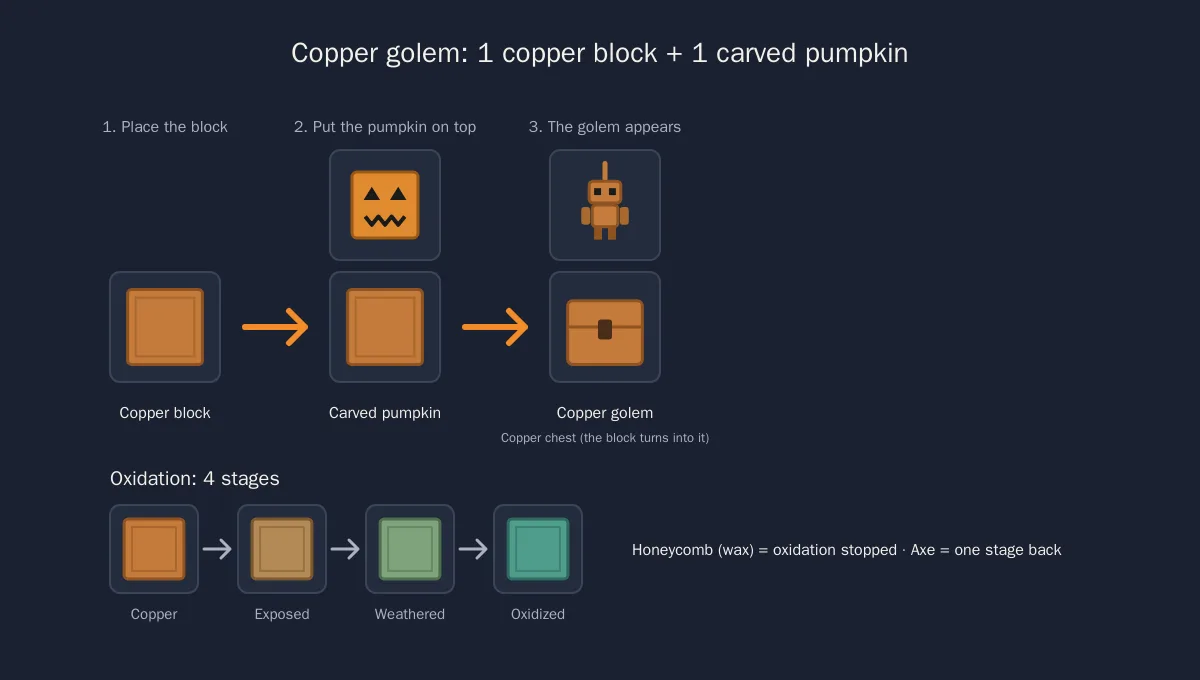
Unlike the iron golem (four iron blocks in a T), the copper golem only needs one block of copper. Start with a fresh block, neither waxed nor oxidized: it is the simplest case and the golem starts without any trace of oxidation.
🧭 What does it do?
The copper golem is an automatic sorter. Its work cycle never changes:
- It opens its copper chest and takes a stack of items.
- It looks for a nearby chest that already contains that type of item and drops the stack there.
- If none exists, it picks a chest that has free space and stores the stack there.
- If nothing works (everything is full), it brings the items back to the copper chest and tries again later.
This behaviour has one practical consequence: for clean sorting, prime your chests. Put one cobblestone in the "stone" chest, one iron ingot in the "ores" chest, one carrot in the "food" chest. The golem follows these hints and your room stays organized.
What it does not do:
- it picks up nothing from the ground;
- it takes nothing out of your other chests, it only fills them;
- it sorts by exact item type: a chest primed with oak logs receives oak logs, not birch logs;
- it ignores anything too far from its copper chest: keep your storage chests in the same room.
Put the copper chest near the base entrance. Every player coming back from an expedition dumps their inventory in two clicks and the golem does the rest. Add a "misc" chest primed with nothing and unknown items all end up in the same place.
🧪 Oxidation and wax
The golem is made of copper, so it behaves like a block of copper exposed to air: it oxidizes gradually over in-game days, through four stages.
| Stage | Look | Does the golem still work? |
|---|---|---|
| Copper | Bright orange | Yes |
| Exposed copper | Dull orange, first spots | Yes |
| Weathered copper | Green and orange mixed | Yes |
| Oxidized copper | Full verdigris | No: it becomes a statue |
At the last stage the golem freezes into a copper golem statue. It stops sorting and stays decorative until you step in.
Three tools to manage oxidation:
- Honeycomb: right-click the golem to wax it. It stays at its current stage for good and never becomes a statue. Honeycombs come from a full beehive sheared with shears.
- Axe: right-click to remove the wax, then one click per stage to bring it back down to bright copper.
- Axe on the statue: scraping a fully oxidized statue brings the golem back to life.
Waxing only freezes the current state. If you wait until the golem is green, you get a green golem forever. Wax it right after building it if you want the orange look, or right after scraping it with an axe.
The copper chest also comes in several oxidation states, purely visual: it keeps working whatever it looks like.
🤖 Copper golem vs iron golem
The two golems share the carved pumpkin, and that is about it.
| Copper golem | Iron golem | |
|---|---|---|
| Construction | 1 block of copper + 1 carved pumpkin | 4 iron blocks in a T + 1 carved pumpkin |
| Natural spawning | Never, only built by a player | Yes, in villages and during raids |
| Role | Sort items from the copper chest into nearby chests | Protect villagers, attack monsters |
| Combat | None, it neither attacks nor retaliates | Strong, knocks hostile mobs back |
| Size | Small, about one block tall | Tall, bigger than a player |
| Wear | Oxidizes over time, ends up as a statue | Never oxidizes, healed with iron ingots |
| Drops | Do not count on it: build it, do not kill it | Iron ingots and poppies |
In short: the iron golem protects, the copper golem tidies up. They complement each other in a base: an iron golem at the door, a copper golem in the storeroom.
🌐 The copper golem on your server
For your players to build copper golems, your server must run 1.21.9 or newer. At Lordhosting you change the version from the panel in a few clicks; after switching, restart and check that your plugins are compatible, especially land protection and inventory sorting plugins.
A few multiplayer-specific tips:
- Protect the storage room. A dead golem means sorting by hand again and rebuilding a copper chest.
- Wax the golems in shared areas. Nobody wants to find a green statue on a Monday morning.
- One golem per theme. Ores, food, building blocks: three golems, three copper chests, three groups of primed chests, and no more cobblestone piles in the diamond chest.
- On a modded server, wait until your mods support 1.21.9 before migrating. Our guide to the best Minecraft mods explains how to check a mod's compatibility with a version.
To size a server that hosts a big automated base properly, read how much RAM for a Minecraft server.
⚙ Going further
- How to create a Minecraft server (complete guide): from installation to inviting your friends.
- Minecraft Java commands: the complete list: give op, change the weather, teleport your players.
- The best Minecraft mods: optimization and sorting mods to complement your golem.
- Enable the Minecraft whitelist: keep your server for your friends only.
🎮 Tidy up your base with friends on your Minecraft server
A copper golem only makes sense when several players fill the same chest. Launch your Minecraft server at Lordhosting: it is delivered in under a minute, on version 1.21.9 or newer, and you can try it free for 24 hours with no credit card.
❓ Need help?
A question about your server version or a protection plugin? Our team answers 7 days a week. 👉 Contact LordHosting support
Frequently asked questions
Related guides
Create a Minecraft server (Java & Bedrock): 2026 guide
How to create a Minecraft Java or Bedrock server in 2026: free self-hosting or dedicated host. Step-by-step guide, server.properties config, mods.
Playing Minecraft Crossplay on PS5 & PC
Yes, PC (Java) and PS5/Xbox/Switch (Bedrock) players can play Minecraft together: here's how to enable crossplay on your server, step by step.
How to get a custom IP for your Minecraft Java server (SRV)
Set up a custom domain for your Minecraft Java server with an SRV record. Hide the IP and port and make access easier for your players.
How to disable rain in Minecraft (Java and Bedrock)
How to stop the rain in Minecraft Java and Bedrock: commands, gamerules, plugins and tips to control the weather on your server.















