 Minecraft Java Edition
Minecraft Beacon: the complete guide
How to craft a beacon in Minecraft, build the pyramid from level 1 to 4, pick the best effects and activate it: a complete guide with tables.
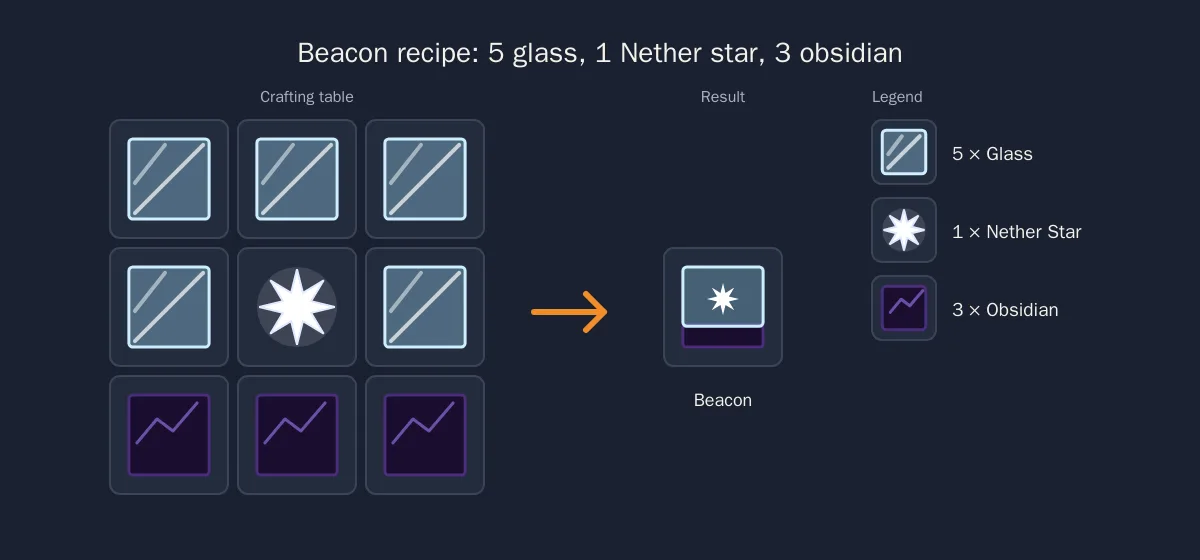
A beacon is crafted with 1 Nether Star, 5 glass blocks and 3 obsidian, then placed on top of a pyramid made of iron, gold, emerald, diamond or netherite blocks. The taller the pyramid (1 to 4 levels), the wider the range and the stronger the available effects: Speed, Haste, Resistance, Jump Boost, Strength and Regeneration.
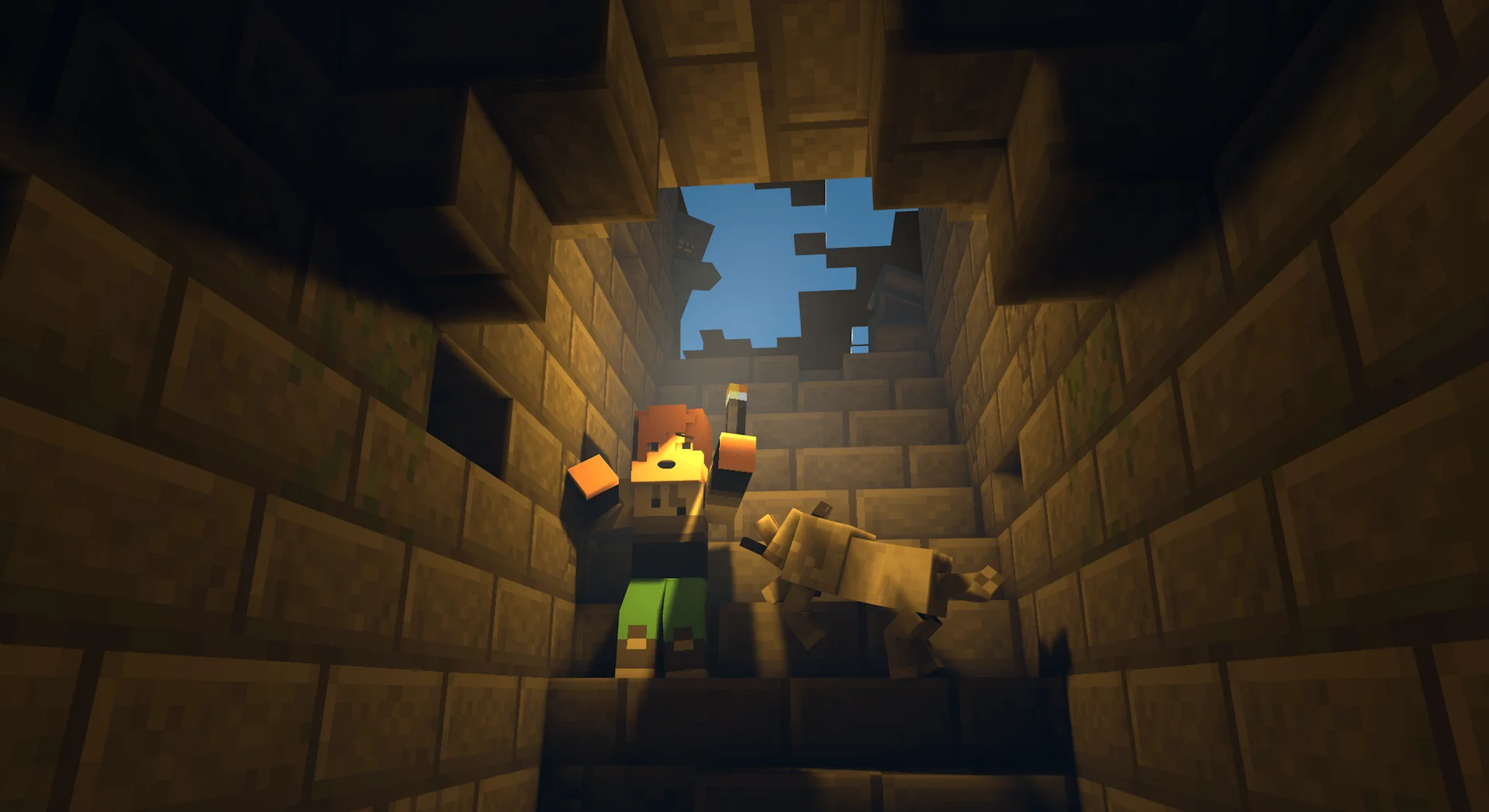
The Minecraft beacon is one of the most sought-after blocks in the game. It shoots a beam of light visible from far away and gives permanent buffs to every player standing around it: mine faster, run faster, take less damage or regenerate health. It is the ultimate endgame block, the one you build at the center of your base or your spawn.
This guide covers everything in order: the beacon recipe, the pyramid to build under it, the effects table by level, then activation and a few tricks for the beam color. On a shared Minecraft server, a beacon at spawn benefits everyone at once, which makes it the perfect group project.
All the information below applies to Minecraft Java Edition in its recent versions. Range and duration values are the same on Bedrock, apart from a few interface details.
📑 Table of contents
- Beacon recipe
- Building the pyramid (levels 1 to 4)
- Available effects
- Activating the beacon
- Coloring the beam and optimizing your beacon
- FAQ
🔨 Beacon recipe
The recipe fits in a regular crafting table and needs three ingredients:
| Ingredient | Quantity | Where to find it |
|---|---|---|
| Nether Star | 1 | Dropped by the Wither (boss) |
| Glass block | 5 | Sand smelted in a furnace |
| Obsidian | 3 | Lava cooled by water, mined with a diamond or netherite pickaxe |
Layout in the crafting grid:
Glass     Glass        Glass
Glass     Nether Star  Glass
Obsidian  Obsidian     Obsidian
The Nether Star is the only truly hard ingredient. It does not exist anywhere in the world: you have to summon and defeat the Wither. To summon it, place 4 soul sand (or soul soil) blocks in a T shape, then put 3 wither skeleton skulls on the three top blocks. The boss appears immediately, with 300 health points on Java and a spawn explosion that wrecks everything around it.
Summon the Wither far from your base, ideally underground or in the End, with enchanted armor, a Smite sword (the Wither is undead) and regeneration potions or golden apples. Wither skeleton skulls come from Nether fortresses, with a low drop chance per skeleton that the Looting enchantment increases.
Good news: the Wither always drops one Nether Star, and the star survives explosions once on the ground. You only need to beat it once per beacon.
🧱 Building the pyramid (levels 1 to 4)
A beacon placed on the ground does nothing. It must sit at the center of the top layer of a pyramid made of mineral blocks. Five blocks are accepted, and you can mix them:
- block of iron (9 iron ingots),
- block of gold (9 gold ingots),
- block of emerald (9 emeralds),
- block of diamond (9 diamonds),
- block of netherite (9 netherite ingots).
The block type changes neither the effects nor the range. Iron is therefore the most common choice, since it is by far the easiest to produce in bulk, especially with an iron golem farm.
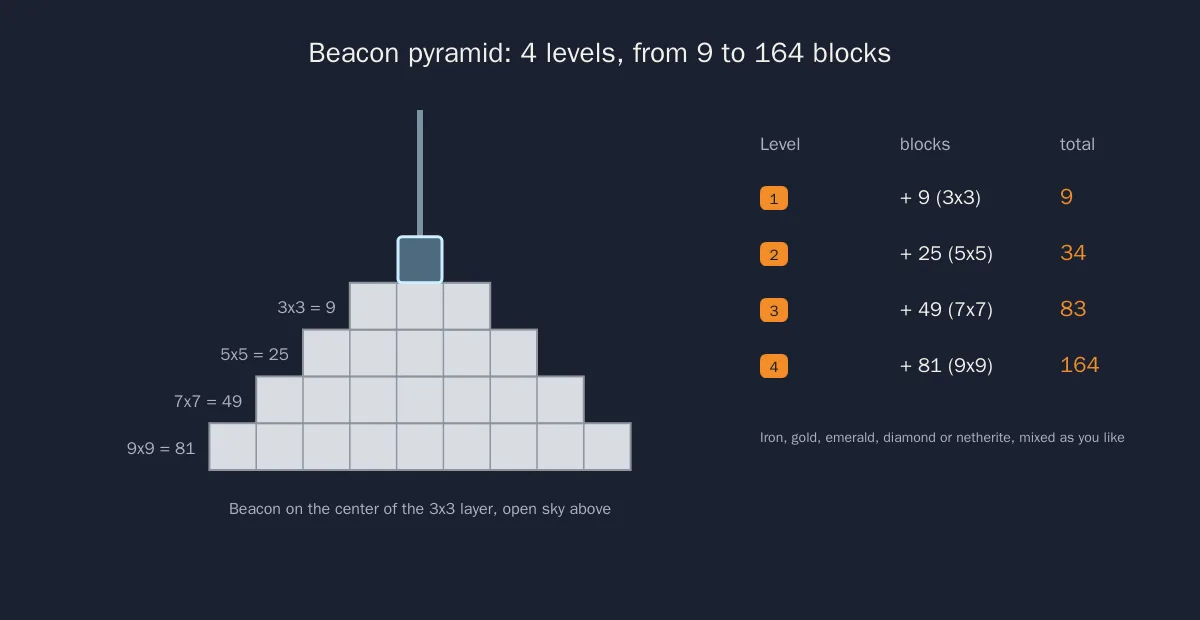
Each level adds a square layer under the previous one, always centered under the beacon:
| Level | Layers (top to bottom) | Blocks in the added layer | Total blocks | Ingot equivalent |
|---|---|---|---|---|
| 1 | 3x3 | 9 | 9 | 81 |
| 2 | 3x3 + 5x5 | 25 | 34 | 306 |
| 3 | 3x3 + 5x5 + 7x7 | 49 | 83 | 747 |
| 4 | 3x3 + 5x5 + 7x7 + 9x9 | 81 | 164 | 1,476 |
A few rules to follow:
- Every layer must be complete: a single missing block drops the pyramid to the lower level.
- The beacon goes on the center block of the 3x3 layer, not next to it.
- Nothing opaque may sit above the beacon: it needs to see the sky.
- The layers can be buried or built into a structure, as long as their shape is respected.
Start with the widest base (9x9 for level 4), then build upward. On a server, building plugins such as WorldEdit make placing the 164 blocks much faster: our guide WorldEdit and schematics on a Minecraft server explains how to install it.
✨ Available effects
Effects unlock progressively with the pyramid level. The beacon applies one primary effect chosen among those of its level and, at level 4, an extra secondary effect.
| Pyramid level | Available primary effects | Secondary effect | Horizontal range | Effect duration |
|---|---|---|---|---|
| 1 | Speed I, Haste I | None | 20 blocks | 11 seconds |
| 2 | + Resistance I, Jump Boost I | None | 30 blocks | 13 seconds |
| 3 | + Strength I | None | 40 blocks | 15 seconds |
| 4 | All of the above | Regeneration I or level II of the primary effect | 50 blocks | 17 seconds |
The beacon reapplies the effect every 4 seconds to every player inside its area (monsters and animals are not affected). Since the duration is always longer than the interval, the effect is permanent as long as you stay in range. If you leave the area, it fades after a few seconds.
Vertically, the area extends from the beacon up to the top of the world, and downward by a distance equal to the horizontal range. A beacon placed on the surface therefore also covers the first layers of your mine.
What each effect does:
- Speed: faster movement, handy around a large spawn.
- Haste: faster mining and chopping, the favorite of miners and builders.
- Resistance: reduces damage taken, useful on a PvP base or near a spawner.
- Jump Boost: jump higher, ideal for moving across rough terrain.
- Strength: increases melee damage.
- Regeneration: continuously restores health, the most popular secondary effect.
At level 4 you choose between Regeneration I and level II of the primary effect. Haste II, for example, lets you break stone almost instantly with an Efficiency V pickaxe.
🔦 Activating the beacon
Once the pyramid is finished and the beacon placed, the beam lights up, but no effect is active yet. You still need to configure it:
- Right-click the beacon to open its interface.
- Put a payment item in the dedicated slot: 1 iron ingot, 1 gold ingot, 1 emerald, 1 diamond or 1 netherite ingot. The item is consumed whatever its type, so an iron ingot is enough.
- Choose the primary effect in the left column. Greyed-out effects belong to a pyramid level you have not reached yet.
- At level 4, choose the secondary effect in the right column.
- Confirm with the check button.
To change the effect later, reopen the interface and pay another ingot or gem. If you enlarge the pyramid, the new effects appear automatically in the interface, but you have to pay again to select them.
Any opaque block placed above the beacon disables it instantly. Glass, stained glass, water and most transparent blocks let the beam through. For an indoor beacon, plan a vertical light shaft up to open air.
On a server, operators can quickly test a setup with /give @s minecraft:beacon or /give @s minecraft:nether_star, provided they have the rights. Our Minecraft Java commands list details the required permissions.
🎨 Coloring the beam and optimizing your beacon
Coloring the beam. Place a stained glass block or pane directly above the beacon: the beam takes that color. By stacking several glass blocks of different colors, each new layer blends with the previous color, giving intermediate shades. A colored beam also works as a landmark: one color per area of the map, or per team.
Sharing a pyramid between several beacons. A pyramid can support several beacons as long as each one has a complete square under it. Players often build a large rectangular base with 4 or 6 beacons in a row, each set to a different effect, to enjoy every buff in the same place. The block cost climbs quickly, but the result covers every need of a base.
Placing the beacon in the right spot. Since the range extends up to 50 blocks below the beacon, a level 4 beacon on the surface covers a mine down to roughly fifty blocks deep. To reach the diamond layers, place a second beacon lower down, or bury the pyramid with a light shaft.
Protecting the investment. On an open server, a diamond pyramid attracts attention. Prefer iron, protect the area with a claims plugin, or enable the whitelist to welcome only trusted players.
⚙ Going further
- Minecraft enchantments: full list and best picks: an Efficiency V pickaxe combined with Haste II is the fastest mining in the game.
- Minecraft Java commands: give a Nether Star, teleport players or switch to creative to test a pyramid.
- WorldEdit and schematics on a Minecraft server: build the 164 blocks of the pyramid in a few commands.
- How to create a Minecraft server: the complete guide to launch your own world and build your beacon in it.
🎮 Play with your friends around your beacon
A beacon makes the most sense when several players benefit from it: a shared spawn with Speed and Regeneration, a group mine under Haste II. Rent your Minecraft server at Lordhosting: it is delivered in under a minute, with mods and plugins installable in one click from the panel.
❓ Need help?
Our support team answers your questions about your Minecraft server 7 days a week. 👉 Contact LordHosting support
Frequently asked questions
Related guides
Minecraft enchantments: full list and best picks
The full list of Minecraft enchantments, how to build a level 30 enchanting table with 15 bookshelves, and the best enchantments for every item.
Minecraft Java Commands: The Complete and Up-to-Date List
Every Minecraft Java command: open the console, gamerules (keepInventory...), teleportation, XP, effects, server admin commands (op, ban.
Minecraft Warden: The Complete Guide
Everything about the Minecraft Warden: where it spawns, its health, its attacks and the best strategies to avoid it or defeat it in survival.
Which Java Version to Choose for Your Minecraft Server?
Complete guide to choosing the right Java version for your Minecraft server. Java 8, 17, 21? Find the right version based on your jar and mods.















